
Use a real project owner account
The project owner controls access, approval status and the project record. Invite collaborators after the project exists.
Choose where you are in your project. Follow the practical steps, find a specific task, or ask Mobi to point you in the right direction.
Try “CSV import”, “upload signed copy”, “calendar” or “budget transfer”.
Start with your goal
Set up your account, invite your team, write and export the application.
Explore writing → 02 · AFTER APPROVALKeep budgets, participants, documents and delivery evidence organised.
Explore management → 03 · FINAL HANDOVERCheck the files, prepare the right version and resolve download problems.
Explore final exports →Browse the full guide below, or choose a path to focus on the chapters you need.
Before you start
The project owner controls access, approval status and the project record. Invite collaborators after the project exists.
MobilityCloud organises the work, but official Programme Guide and National Agency requirements always remain the source of truth.
Start with writing and planning. After approval, continue in the same project with implementation modules.
Sidebar menu
The sidebar stays available while you work. It takes you to cross-project areas; once you open a project, its own tabs keep the application, implementation and evidence work connected to that project.
Use the sidebar to move between areas that belong to your account. Use a project’s internal tabs to work inside that particular project, so you never mix up documents, people or budget data from different projects.
Prepare your workspace
The dashboard brings projects, available funding, current priorities and quick actions into one view. It is the best place to decide what needs attention first.
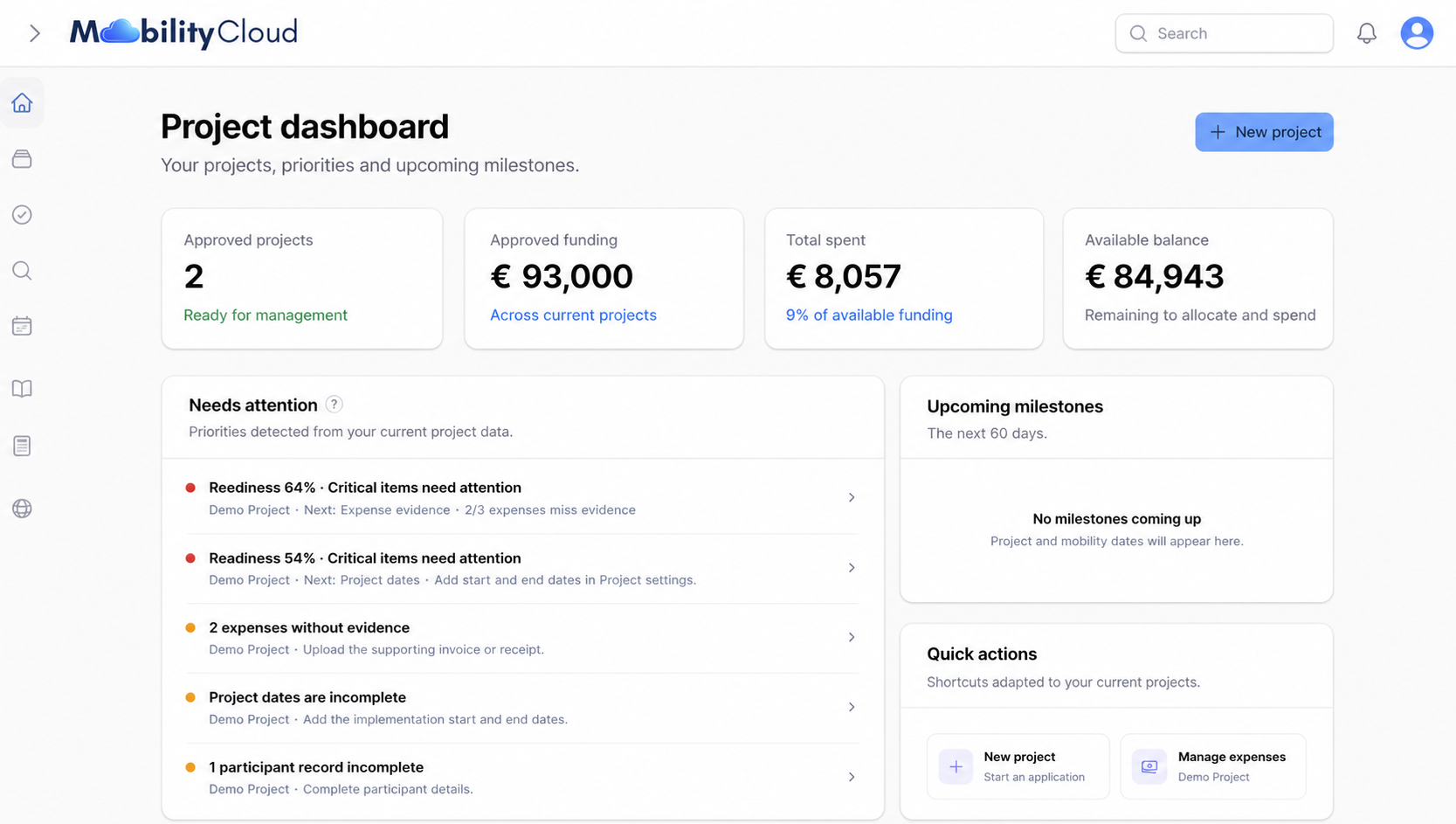
Open the dashboard whenever you return to the platform. It helps you continue from the most important task rather than from the last tab you used.
Create a project
Choose New project from the dashboard. Add the core identity details carefully; they become the context used across writing, planning and implementation.
Keep the project in the writing or planning stage until you know the official result. The management modules are designed to continue after you declare approval.
Write and review
The writing view gives each answer a clear place. Move through the sections, use the guidance where needed and watch the readiness signal before exporting.
Describe the activities, learning methods, preparation and how participants will be supported before, during and after mobility.
Table models
Tables are optional working tools, not official fixed fields. Use normal prose for a question that asks why, how or what you will learn. Add a table when you need to compare several groups, activities, costs, responsibilities or measures.
Example: Why is the project needed? How will you prepare participants?
Example: several activities, participant groups, costs, indicators or audiences.
Use when the question asks what you will do, who will take part, when it happens or who is responsible.
Use when you need to compare national groups, participant profiles, inclusion needs or support roles.
Use for a specific need, exceptional cost, inclusion support or other item that needs a clear justification.
Use when the question asks how objectives, results or impact will be measured.
Use when you must show who will receive results, through which channel and how you will prove the reach.
Start with the smallest useful table: normally one table per question and only the columns you will actually fill. A table is included in the PDF and Word working exports exactly as you write it; you remain responsible for transferring and checking the final information in the official application system.
Declare approval
When the project is approved, use Mark as Approved in the project Overview and declare the exact approved grant amount. The record then continues into budget, participant, document and mobility workflows.
MobilityCloud is an independent working platform. Approval decisions, contractual obligations and official reporting always remain with the competent National Agency and official systems.
Manage implementation
After approval, the project navigation gives each operational area its own workspace. Start with budget baskets, then add the people, files and daily mobility evidence needed for delivery.
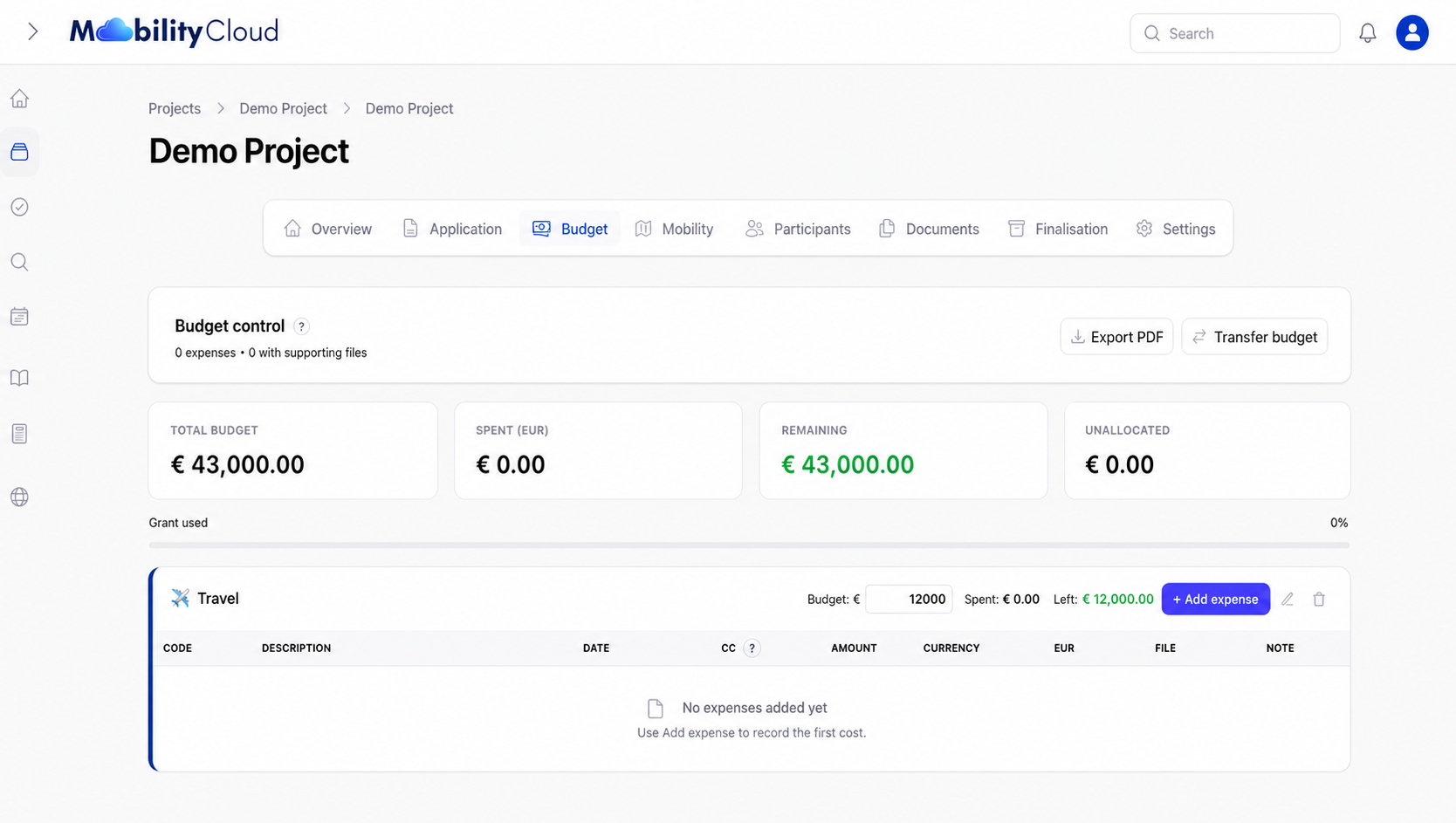
Create baskets, enter expenses and attach the relevant invoice, receipt or support file.
Check: amount, currency, evidenceAdd the group when it is known, complete required details and keep participant documents connected.
Check: contacts, documents, statusSeparate project files, generated records and signed copies so the document list remains understandable.
Check: checklist and signed copiesCreate one entry for each activity day and add photos, links, notes and files while the mobility happens.
Check: every day has proofPrepare final files
The finalisation stage is easier when the record has been maintained during implementation. Use the checks below before you prepare files for internal review or official reporting.
Practical instructions
Set up the account that will own the project before entering project data.
Create an account, complete the required billing identity in Account Center, then create a project from Projects. Choose whether you are writing an application or managing a project that is already approved.
Profile, billing and preference fields save automatically. Changing your password is a separate action in Security.
Application answers save after you stop typing. PDF and Word exports use saved content; they do not submit the application to the funding authority.
Practical instructions
Give collaborators access to the project they need, with a role suited to their responsibility.
The project owner manages invitations through Project access. The invitation must be accepted before the colleague can use the shared project.
Available controls depend on your project role and project stage. Viewers have read-only access; restricted mobility roles see only the relevant operational modules. Some lifecycle and access actions remain with the owner.
Editing locks help prevent two people overwriting the same work. They are separate from your project permissions.
Practical instructions
Keep the approved grant distinct from day-to-day budget allocations and recorded expenses.
After receiving the official decision, use the approval action in the project Overview. Enter the exact approved grant and review the displayed management fee before confirming. The approved grant is locked after declaration.
Add the expense to the relevant budget basket and attach its evidence to that expense. The project budget is a management record, not a replacement for your accounting records.
Transfer budget reallocates an amount between existing baskets. It does not change the declared approved grant or decide whether a transfer is allowed under your funding agreement.
Project currency settings hold the conversion rates used by the project. Check these settings and the currency on each expense before relying on converted totals.
Practical instructions
Use manual entry for individual records, CSV for groups, and form links for participant self-registration.
Use the platform’s blank CSV template so that the column names match the importer. Participant imports accept CSV or text files up to 5 MB.
Participants can complete a public registration form. You can use a general project form or a link for one mobility, without giving participants access to your project workspace.
The register checks the data and files expected for participants. A missing-data indicator is a prompt to review the record; it does not assess official eligibility.
Practical instructions
Keep general files, generated records and signed versions connected to the right project records.
Use Documents for general project files. Expense evidence belongs with its expense, participant files with the participant, and daily mobility evidence with the relevant mobility.
A generated record and its signed copy are different files. Attach the signed version through that record’s signed-copy action so the platform can track it correctly.
Start by checking the project, module and filters. Uploading a file to an expense or participant does not place it in every document list.
Practical instructions
Organise delivery evidence while activities are happening, rather than collecting everything at the end.
Use the Mobility module to keep activity information, daily evidence, materials and outputs associated with the correct mobility.
Feedback forms provide public response links for a selected mobility. The results are anonymous; avoid asking respondents to identify themselves in free-text answers.
Practical instructions
Distinguish automatic checks from the follow-up work assigned to your team.
Team tasks are manual reminders. Stage priorities are generated from the project data; completing a manual task does not automatically fix missing project information.
No. Readiness highlights missing information and records to review. It is not a funding decision, a compliance certificate or a guarantee that a submission is complete.
Practical instructions
Writing is free. The management fee is a one-time charge for an approved project, not a monthly subscription.
The current global management fee is 0.5% of the approved grant, payable after the first grant instalment. A negotiated percentage or fixed amount may apply to your account. Check the fee shown when declaring approval and the invoice for your project.
Contact MobilityCloud support about an incorrect invoice, cancellation or refund. Platform administrators manage these changes; an organisation user cannot cancel its own invoice from the project.
Implementation modules become available when approval is declared. Payment follows the first grant instalment. The current platform does not block final exports until payment; your role and project stage still determine which actions are available.
Practical instructions
Prepare a handover copy from the saved project data, and know which version you are downloading.
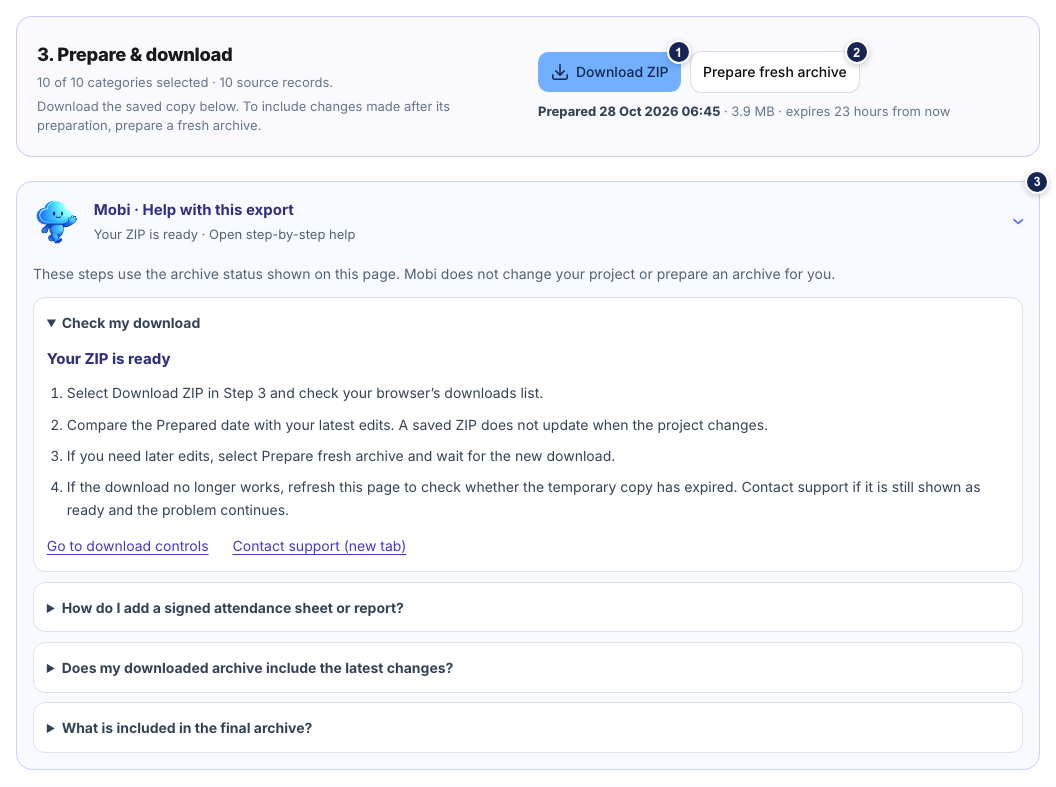
Finalisation brings together advisory checks, content selection and ZIP preparation. The archive is a snapshot of your project data and selected files, not an official final-report submission.
An existing ZIP keeps the saved snapshot from its preparation. Editing the project does not update an already generated ZIP. Use Prepare fresh archive to include later changes.
Download links are temporary and normally expire after 24 hours. An expired or failed archive can be prepared again; this does not remove the project’s source data.
You choose categories such as project data, application, participants, budget, signed agreements, generated records, project files, mobility, dissemination and feedback. The source-record count is not a promise of the same number of ZIP files.
Practical instructions
Use the visible message and the correct project context to narrow down the problem.
A validation message, connection problem or editing lock can prevent a save. Mobi cannot see your account or confirm whether a change was saved.
Mobi finds prepared answers from this public guide. It does not use an external AI service, read your account, modify projects or provide official funding decisions. Questions are matched in your browser and are not sent to an AI provider.
Button reference
Use this reference while working in the platform. Controls are grouped by the screen where they appear, so you can find the action before you use it. Labels can differ slightly when your role is view-only or a project is not yet approved.
Available across the platform
Returns to the project dashboard.
Shows or hides the left navigation labels.
Searches the information available to your account.
Opens account and project notifications.
Opens your account settings and sign-out options.
Inside one project
Invites collaborators and manages their access to this project.
Creates a manual follow-up task for the project team.
Shows stage priorities, readiness, funding and project details.
Opens the relevant project workspace without losing the project context.
Moves a project to the completed state when implementation is genuinely finished.
Writing and review
Moves between application questions and shows which sections are complete or still need work.
Stores the text for the selected application question.
Adds a text-only answer outline with prompts for context, examples, responsibilities and results.
Opens reusable writing content and guidance.
Creates an optional, editable table below the current question.
Highlights incomplete or weak application areas before export.
Creates a working export of the application content.
Approved-project implementation
Downloads a project budget summary in PDF format.
Moves an amount between existing budget baskets.
Adds a new expense row to the selected basket.
Attaches a supporting invoice, receipt or file to that expense.
Adds a short internal explanation to an expense.
Changes a basket or creates another category for budget tracking.
Removes the selected budget record.
Records and supporting files
Creates one participant record manually.
Imports multiple participant rows from a CSV file.
Creates or manages the public link used for participant self-registration.
Adds a general project document such as a source file, agreement or supporting record.
Adds or replaces the signed version of a generated record.
Narrows the document or participant list without changing data.
Daily proof and handover
Creates a day card for a mobility activity.
Attaches photos to one evidence day.
Attaches agendas, worksheets, presentations, certificates or other files to one evidence day.
Removes the day entry while uploaded files remain in the project files list.
Adds project-wide materials, outputs or implementation files.
Shows which records still need review before final preparation.
If a control is missing or disabled, your project role, project stage or account status may not allow that action. Ask the project owner before trying to work around access limits.